Community Spotlights
NebulaGraph Source Code Explained: fbthrift
Aiee
Overview
Nebula Clients provide users with APIs in multiple programming languages to interact with NebulaGraph and repackages the data structure returned by the server for better use.
Currently, Nebula Clients support C++, Java, Python, Golang, and Rust.
Framework for service communication
Nebula Clients use fbthrift https://github.com/facebook/fbthriftas the RPC framework for service communication between servers and clients to implement cross-language interaction.
At a high level, fbthrift is:
A code generator: fbthrift has a code generator that generates data structures that can be serialized using Thrift in different languages.
A serialization framework: fbthrift has a set of protocols to serialize the generated structures created from the code generator.
An RPC framework: fbthrift has a framework to send messages between clients and servers and to call application-defined functions when receiving messages in different languages.
Examples
Take the Golang client as an example to show the application of fbthrift in NebulaGraph.
The definition of the
Vertexstructure in servers:
Define some data structures in
src/interface/common.thrift:
In the above example, we define a Vertex structure. (cpp.type = "nebula::Vertex") indicates this structure corresponds to the nebula::Vertex of the server.
fbthrift will automatically generate the data structure in Golang:
In
MATCH (v:Person) WHERE id(v) == "ABC" RETURN v, the client requests a vertex (nebula::Vertex) from the server. The server will serialize it after finding it. After the server finds this vertex, it will be serialized and sent to the client through thetransportof the RPC communication framework. When the client receives this data, it will be deserialized to generate the corresponding data structure (type Vertex struct) defined in the client.
Clients
In this section, we will take nebula-go as an example to introduce different modules of the client and their main interfaces.
Configs provides the whole configuration options.
Session provides an interface for users to call directly.
The definition of interfaces is as follows:
ConnectionPool manages all connections. The main interfaces are as follows:
Connection packages the network of thrift and provides the following interfaces:
LoadBalance is used in the connection pool.
Policy: Polling
Interaction of modules
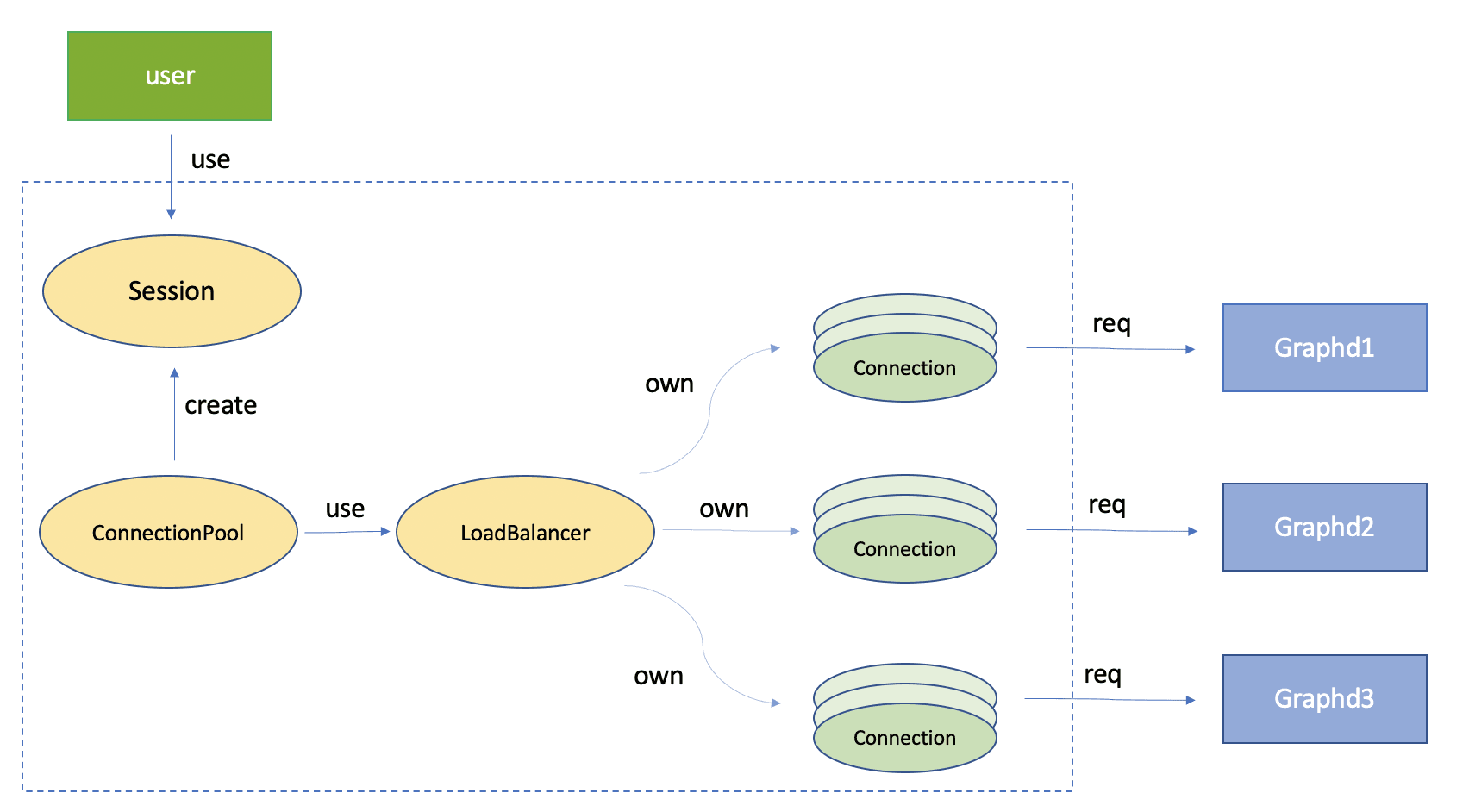
Connection pool
Initialize:
When using it, the user needs to create and initialize a connection pool. During initialization, the connection pool will establish a connection at the address of the Nebula service specified by the user. If multiple Graph services are deployed in a cluster deployment method, the connection pool will use a polling policy to balance the load and establish a nearly equal number of connections for each address.
Manage connections:
Two queues are maintained in the connection pool, idle connection queue and active Connection Queue. The connection pool will periodically detect expired idle connections and close them. These two queues will use read-write lock to ensure the correctness of multi-thread execution when adding or deleting elements.
When Session requests a connection to the connection pool, it will check whether there are usable connections in the idle connection queue. If there are any usable connections, they will be directly returned to the Session for users to use. If there are no usable connections and the current total number of connections does not exceed the maximum number of connections defined in the configuration, a new connection is created to the Session. If it reaches the maximum number of connections, an error is returned.
Generally, the connection pool needs to be closed only when you close the program. All connections in the pool will be disconnected when the program is closed.
Session
Session is generated through the connection pool. The user needs to provide the password for authentication. After the authentication succeeds, the user will get a Session example and communicate with the server through the connection in the Session. The most commonly used interface is
execute(). If an error occurs during execution, the client will check the error type. If it is a network error, it will automatically reconnect and try to execute the statement again.Note that a Session does not support being used by multiple threads at the same time. The correct way is that multiple sessions are applied by multiple threads, and one session is used by each thread.
When the Session is released, the connection held by it will be put back into the idle connection queue of the connection pool so that it can be reused by other sessions later.
Connection
Each connection example is equivalent and can be held by any Session. The purpose of this design is to allow these connections to be reused by different Sessions, reducing repeatedly enabling and disabling Transport.
The connection will send the client's request to the server and return the result to the Session.
Example
Returned data structure
The client packages the returned query results by part of the complex servers and adds an interface for convenience use.
Basic type of returned results | Packaged type |
|---|---|
Null | |
Bool | |
Int64 | |
Double | |
String | |
Time | TimeWrapper |
Date | |
DateTime | DateTimeWrapper |
List | |
Set | |
Map | |
Vertex | Node |
Edge | Relationship |
Path | PathWrraper |
DateSet | ResultSet |
- | Record (For row operations of ResultSet) |
nebula::Value will be packaged as ValueWrapper in the client and converted to other structures through interfaces. (i.g. node = ValueWrapper.asNode())
Analysis of data structure
For MATCH p= (v:player{name:"Tim Duncan"})-[]->(v2) RETURN p, the returned result is:
We can see that the returned result contains one row, and its type is a path. At this time, you can execute as follows to get the properties of the destination vertex of the path (v2).
Address of clients
The GitHub addresses of clients are as follows:
If you encounter any problems in the process of using NebulaGraph, please refer to NebulaGraph Database Manual to troubleshoot the problem. It records in detail the knowledge points and specific usage of the graph database and the graph database NebulaGraph.
Join our Slack channel if you want to discuss with the rest of the NebulaGraph community!